


Powerful.^250 Evolving.^250 eCommerce.^500
Everything you need to add, create and
manage your online business.^500
Join our 50,000+ users. Try it out!^2000
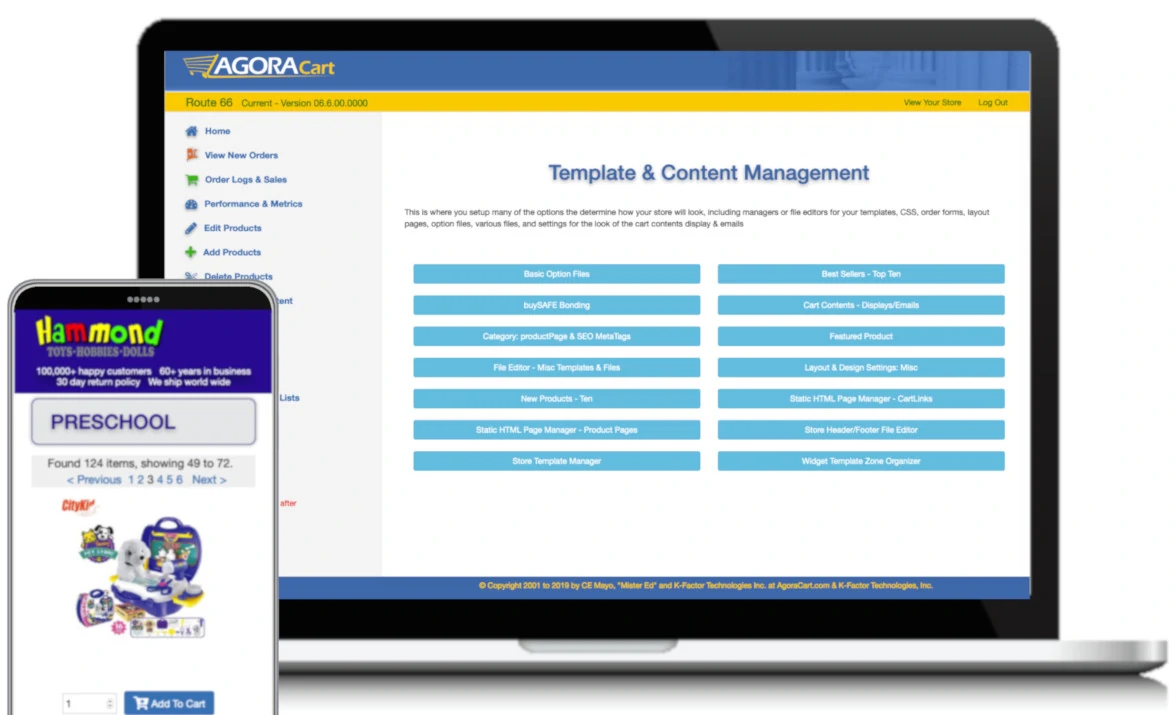
AgoraCart is one of the early open source software (OSS) pioneers providing free shopping cart software. For 20+ years we have provided top quality shopping cart solutions for small and medium sized ecommerce businesses. A lot has changed from the early days, but we still proudly produce one of the best ecommerce shopping cart software solutions that offers online retailers flexibility, power, and customization that is second to none for small ecommerce businesses.
AgoraCart (community version) is built as Free Open Source Software ( f/OSS ) using Perl, Javascript, jQuery, HTML 5, CSS 3, Font-Awesome, and popular JS/CSS frameworks such as Materialize and Bootstrap. Our ecommerce shopping cart software is responsive designed, mobile ready, and is community driven in its design and software development, which keeps the focus on your needs - the merchant.
AgoraCart is very flexible design wise and offers a very wide range of functions & features that allow you to setup an online ecommerce shopping cart by using either the available free templates, copying one as a base to start customizing with your own look, or by creating your own from scratch and uploading to your store directories. AgoraCart's flexible modular system also allows you complete customization of the UI / UX ( user interface / user experience) and the CX (customer experience) using templates including the store's headers & footers, product pages (ppincs), order forms, thank you pages, custom emails, CSS files, HTML widgets that customize the default programming code, and even the Plug in and Play modules. In the end, AgoraCart can be as simple or complex as you make it.
AgoraCart can be easily installed on your existing website using our installer script that downloads our shopping cart app, does a basic setup, and when it is finished links you to your new online store manager to begin customizing your newly installed shopping cart solution. Or, your new shopping cart software can be hosted and managed for you so you do not need to worry about webhosting, designing a website or template.
Open source means you can freely use and modify AgoraCart. The Route 66 version is 100% free and customizable.
Benefit from our built-in SEO. Easy manage products, orders, shipping, tax rules, templates and more.
A growing eCommerce Marketplace of add-on modules and templates to expand your store functionality.
Need Help? We've got you covered. AgoraCart offers free community forums or inexpensive one-on-one support.
Open source means you can freely use and modify AgoraCart. The community version is 100% free and customizable.
Benefit from our built-in SEO. Easy manage products, orders, shipping, tax rules, templates and more.
A growing eCommerce Marketplace of add-on modules and templates to expand your store functionality.
Need Help? We've got you covered. AgoraCart offers free community forums or inexpensive one-on-one support.








Gold users are golden in our eyes. We love them! They help support the development of AgoraCart.
Join other gold users for as little as $2 / mo. With your Gold Supporter status, you will receive access to:
Note: The version of AgoraCart that Gold Supporters use is basically the same version as the free side but with functions that connect to your extra supporter benefits and marketplace purchases.
The Storefront and the store manager areas are designed to be responsive and optimized for mobile, tablet and computer screen sizes helping to keeping your eCommerce management handy
Embedded HTML code had been removed from the core code. All HTML, widgets, static HTML pages, and design customization can be handled by templates, layouts, and manager funtions
Storefront language has been removed from core code and can be translated into new language sets. Wording/Phrases can also be overridden in templates and other manager areas
Integration of modern responsive front-end frameworks such as Bootstrap 3 which allows you to prototype your templates faster. Bootstrap 4 and Materialize CSS 1.0 coming shortly.
Route 66 brings a new widget system that replaces cutting and pasting code into templates. Now you can enable HTML widgets and then arrange the order of appearance using drag and drop
Manager screens are mobile ready and have been rearranged into new manager screens with tabs that group admin functions together facilitating easier store management.
AgoraCart has been optimized for better SEO practices, such as removing underscores in URLs, adding schema.org metadata, and improving the management of category page metadata
The AgoraCart backbone is built using Perl 5 and now rewritten and restructured giving you access to cleaner and easier code to manage along with a community to support it
AgoraCart is customizable for nearly any eCommerce need and will grow with your business. It is once again actively developed with new features, and a new SQL database coming soon
It is a fast performing shopping cart application. AgoraCart is a secure solution implemented and does not handle credit card information helping to keep you in PCI compliance.
Gold Version Only: install a helper module and you are ready to import your customer orders and order logs from prior versions of AgoraCart (5.0, 5.2.x, 5.5.x, 6.0.x)
Gold Version Only: install a helper module and you are ready to import your product database and images from prior versions of AgoraCart (5.0, 5.2.x, 5.5.x, 6.0.x)
Current Versions:
in Development:

Add the power of AgoraCart to your website. Download the installer script which checks for hosting compatibility and installs the cart files. Then check out the documentation (coming soon!) and user forums for tips and help with setting up and customizing your webstore.

Don't have a website OR do not want to handle the technical side? Save your brain cells! Get a managed storefront from one of our preferred hosting providers! Click the button below for a list of hosting and design partners that offer managed eCommerce services.
We hope you have enjoyed using AgoraCart and if you feel like it has helped you out and want to support the team you can help us by visiting our sponsors, donating or backing us on Patreon, or becoming a Gold Supporter and enjoying the extra benefits. Any amount would help support and continue development on this project and is greatly appreciated.
SPONSOR AGORACARTBECOME A PATRON